 Import Data Templates
Examples
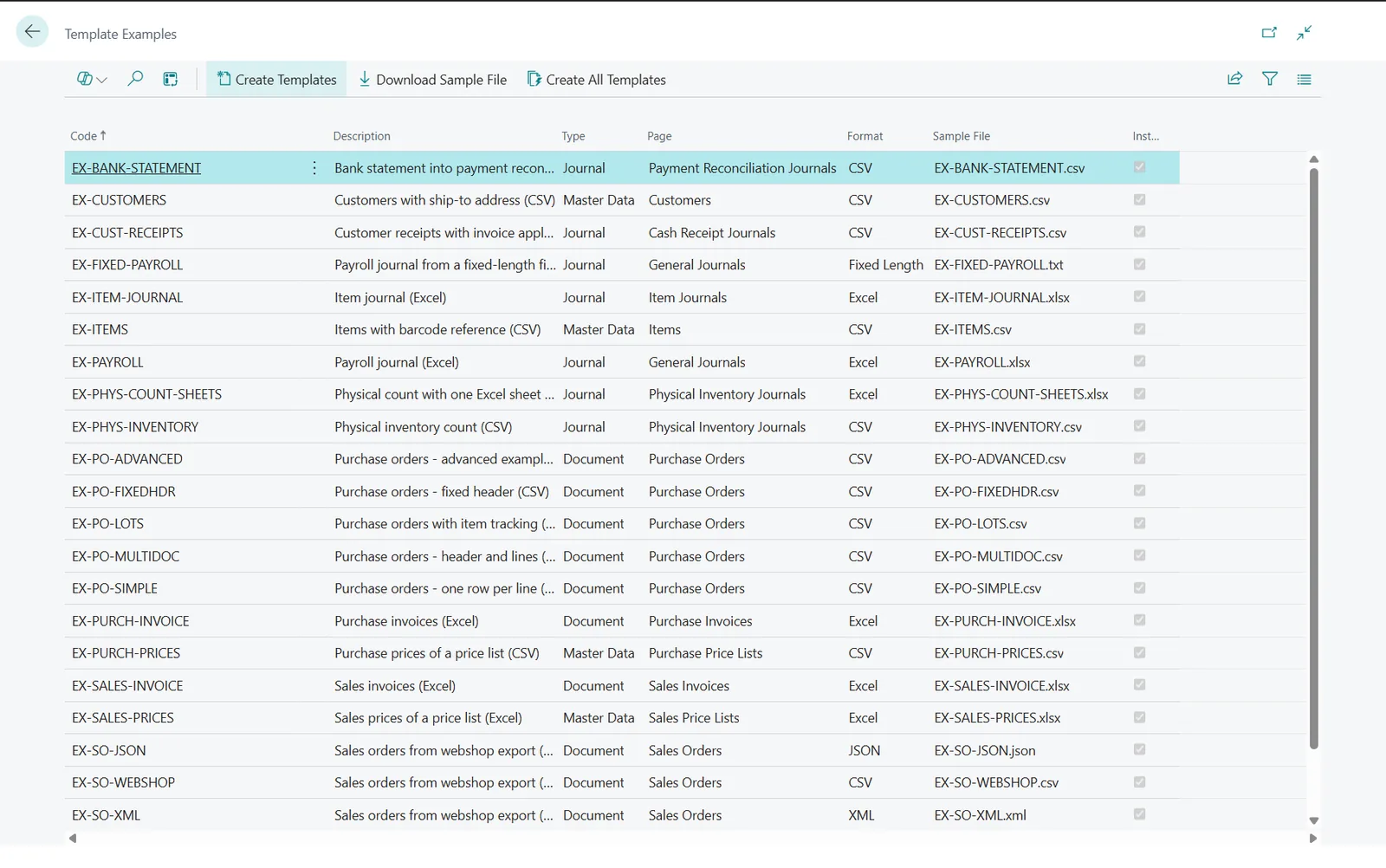
Example templates and sample files
The example templates installed with the app, with their sample files.
The examples cover every import type with a ready template and a matching file. They are created from the Import Templates page with the Examples action, and the setup wizard offers the same list after installation: select the ones you need and choose Create Templates. Each sample file can be downloaded there with Download Sample File, or below. The examples work as they are on the demo company Cronus; files are hosted with the documentation.
Documents
| Template | Imported into | Shows | Sample file |
|---|---|---|---|
EX-PO-SIMPLE | Purchase Orders | One row per order line, CSV | PurchaseOrder-Simple.csv |
EX-PO-MULTIDOC | Purchase Orders | Header and lines on the same row, several orders in one file | PurchaseOrder-MultiDocument.csv |
EX-PO-FIXEDHDR | Purchase Orders | Header values on fixed rows above the lines | PurchaseOrder-FixedHeader.csv |
EX-PO-ADVANCED | Purchase Orders | Row filters, mapping rules, import parameters, template actions | PurchaseOrder-Advanced.csv |
EX-PURCH-INVOICE | Purchase Invoices | One invoice per vendor from an Excel print with a title row; the G/L account of the lines as a default value | EX-PURCH-INVOICE.xlsx |
EX-SALES-INVOICE | Sales Invoices | Item lines from an Excel print; the customer asked as an import parameter | EX-SALES-INVOICE.xlsx |
EX-SO-WEBSHOP | Sales Orders | Orders exported by a webshop: external order number as document separator, order date, item lines | EX-SO-WEBSHOP.csv |
EX-SO-JSON | Sales Orders | The same webshop orders as a JSON export: record node $.orders, line node lines, paths instead of column numbers | EX-SO-JSON.json |
EX-SO-XML | Sales Orders | The same orders as an XML export: record node /Orders/Order, line node Lines/Line, the order number read from the @no attribute | EX-SO-XML.xml |
EX-PO-LOTS | Purchase Orders | Lot numbers and expiration dates on the lines; action Group identical rows into one line | EX-PO-LOTS.csv |
Journals
| Template | Imported into | Shows | Sample file |
|---|---|---|---|
EX-PAYROLL | General Journal | Payroll lines on G/L accounts; account type and document number as default values | EX-PAYROLL.xlsx |
EX-FIXED-PAYROLL | General Journal | Positional text file without headers: date (8), account (10), amount (12), description (30) | EX-FIXED-PAYROLL.txt |
EX-VENDOR-PAYMENTS | Payment Journal | Vendor payments applied to invoices; the bank account asked as an import parameter | EX-VENDOR-PAYMENTS.csv |
EX-CUST-RECEIPTS | Cash Receipt Journal | Customer receipts applied to invoices; same layout as the vendor payments with negative amounts | EX-CUST-RECEIPTS.csv |
EX-ITEM-JOURNAL | Item Journal | Positive adjustments with lot numbers; entry type as a default value | EX-ITEM-JOURNAL.xlsx |
EX-PHYS-INVENTORY | Phys. Inventory Journal | Counted quantities written into the lines created by Calculate Inventory; write mode Update | EX-PHYS-INVENTORY.csv |
EX-PHYS-COUNT-SHEETS | Phys. Inventory Journal | The same count with one sheet per counting team: Import All Sheets, and the sheet name written into Document No. | EX-PHYS-COUNT-SHEETS.xlsx |
EX-BANK-STATEMENT | Payment Reconciliation Journals | Bank statement lines that create or extend the journal; the bank account is asked as an import parameter | EX-BANK-STATEMENT.csv |
Master data and price lists
| Template | Imported into | Shows | Sample file |
|---|---|---|---|
EX-CUSTOMERS | Customer List | Customers with a ship-to address on the same row; write mode Insert or Update | EX-CUSTOMERS.csv |
EX-VENDORS | Vendor List | Vendors with a bank account on the same row | EX-VENDORS.csv |
EX-ITEMS | Item List | Items with a barcode item reference; the base unit of measure asked as an import parameter | EX-ITEMS.csv |
EX-SALES-PRICES | Sales Price Lists | Sales prices of an existing price list chosen as an import parameter; action Replace Prices | EX-SALES-PRICES.xlsx |
EX-PURCH-PRICES | Purchase Price Lists | Purchase prices and line discounts sent by a vendor; action Replace Price List | EX-PURCH-PRICES.csv |
Notes
- The examples refer to the demo company Cronus; adapt account numbers, item numbers and dimension values for another company.
EX-PHYS-INVENTORY: run Calculate Inventory on the batch first.EX-VENDOR-PAYMENTSandEX-CUST-RECEIPTS: replace the invoice numbers with posted ones.
Import Data Templates is available on Microsoft AppSource with a one-month free trial. Licenses are assigned per user in the Microsoft 365 admin center.